
Tutoriels techniques
Odoo vs WordPress: which tool for your SME's website?
Brochure website, e-commerce, stock and CRM: what each tool does, when WordPress is enough, and how to connect the two
By DROUOT Thomas ·
Contents
Odoo vs WordPress: the question comes up every time an SME rebuilds its website. The short answer: WordPress is a tool for publishing a website, while Odoo is business management software that can also publish a website. If your site mainly presents your business and publishes articles, WordPress does the job very well. If your site has to sell, show real stock levels, create quotes or feed your CRM, a website connected to Odoo saves you from re-entering data and keeping two tools in sync.
Skillreso is an Odoo integrator. Further down, we also tell you in which cases WordPress remains the better choice.
Odoo vs WordPress: two tools that do different jobs
WordPress is an open source content management system (CMS). It powers a very large share of the world's websites, from single-page brochure sites to online media. Its strength: thousands of themes and tens of thousands of plugins, and a large number of agencies and freelancers who know how to use it. To sell online, you add the WooCommerce plugin.
Odoo is an ERP, in other words business management software: sales, purchasing, inventory, accounting, CRM, manufacturing, human resources. Its Website and eCommerce apps build a website directly in that database. A product published online is the same product as the one in stock; an order placed on the website lands in sales, with no import and no connector.
Comparing Odoo and WordPress therefore comes down to choosing between two approaches: a standalone website, connected to your other software if needed, or a website integrated into your business management software.
The comparison table
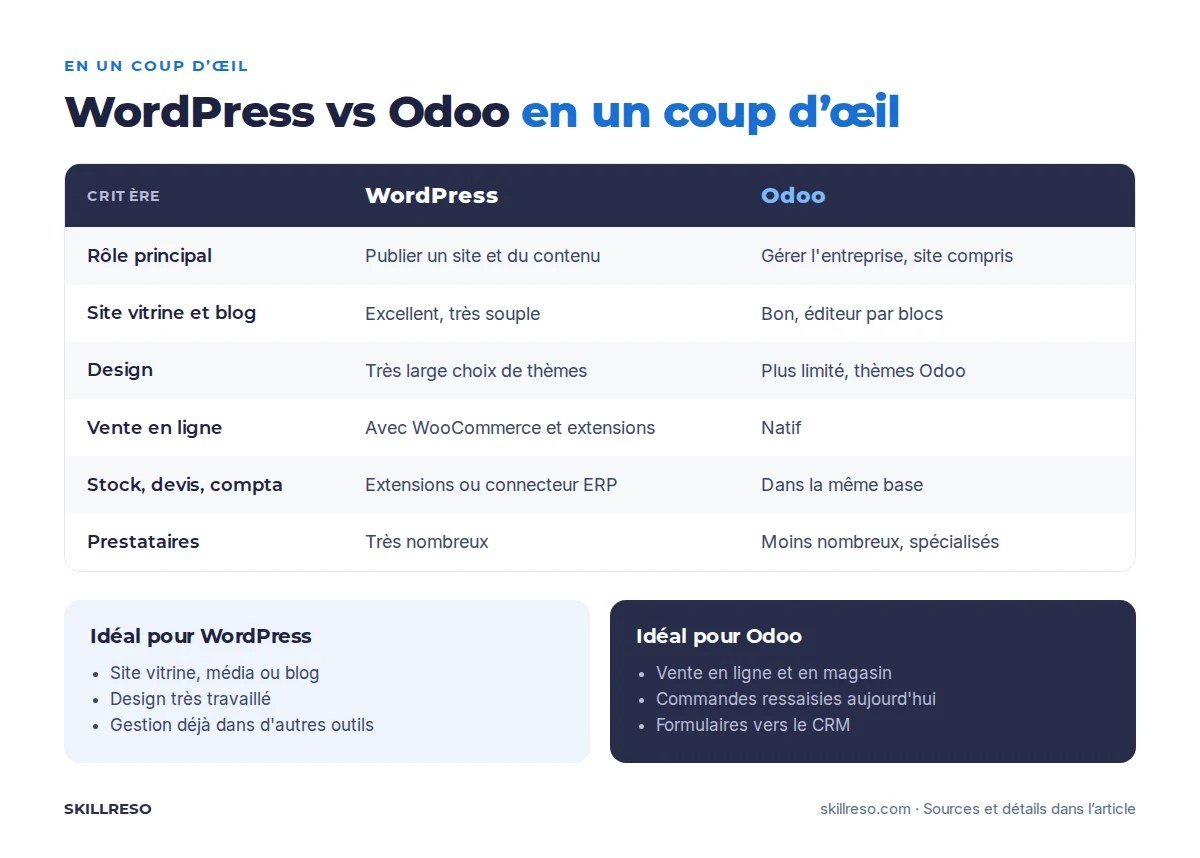
| Criterion | WordPress (+ WooCommerce) | Odoo Website and eCommerce |
|---|---|---|
| Main role | Publishing a website and content | Running the business, website included |
| Brochure website and blog | Excellent, very flexible | Good, block editor |
| Design options | Very wide (themes, page builders) | More limited, Odoo themes |
| Online sales | Yes, with WooCommerce and its plugins | Yes, built in |
| Stock, quotes, invoices, accounting | No, unless plugins or a connector to an ERP | Yes, in the same database |
| CRM | Via a plugin or an external tool | Yes, forms create leads |
| Extensions | Huge catalogue, variable quality | Odoo apps and community modules |
| Maintenance | Frequent updates to the core, the theme and the plugins | A single database to maintain, Odoo version upgrades |
| Available service providers | Very many | Fewer, more specialised |
When to choose WordPress
- Your website is first and foremost a brochure or a media site: company presentation, references, blog, recruitment. No stock, no online orders.
- Design is central: a highly crafted brand, animations, editorial layouts that Odoo's editor does not easily allow.
- Your business management already runs on other tools that suit you, and the website does not need to talk to them.
- You want to be able to switch web agencies easily: the pool of WordPress providers is far larger.
In these cases, moving to Odoo just for the website brings little benefit. We say the same to our clients.
When to choose Odoo for your website
- You sell online and in store: one stock, one price list, one customer record.
- You re-enter orders from the website into your management software, or you keep an eye on a connector that keeps breaking down.
- Your forms must land in the CRM: quote requests, appointment bookings, training course registrations.
- You sell to businesses: customer-specific prices, an ordering portal, quotes signed online, downloadable invoices.
- You already use Odoo to run your business: the website becomes one more app, with no new tool to pay for or maintain.
The third way: keep WordPress and connect it to Odoo
Many SMEs already have a WooCommerce shop that works and established search rankings. Rebuilding everything is not always worthwhile: an Odoo – WooCommerce connector pushes orders up into Odoo and sends stock levels and prices back down to the website.
It is a good compromise to start with. The trade-off: two tools to maintain, and a synchronisation to keep an eye on as the catalogue grows or the pricing rules get more complex.
The fourth way: a custom website connected directly to Odoo
When design and performance matter as much as business management, the two can be separated: a custom website, fast and built for SEO, that reads and writes directly in Odoo (products, prices, stock, orders, blog articles). This is what is known as a headless Odoo website.
The website you are reading works this way: our articles are written in Odoo and displayed by a custom website, in four languages. It is also the approach we chose for a bike shop's online store, presented on our page Odoo for bike shops.
How much does it cost?
Both are open source, but no website is free: you have to budget for hosting, design, implementation and maintenance.
- WordPress: the software is free; you pay for hosting, often a premium theme and plugins (annual subscriptions), and the time spent on updates.
- Odoo: the Community edition, which includes the website and e-commerce, is free; the Enterprise edition is billed per user, at the prices published on odoo.com. The website adds no separate licence.
The real gap is rarely in the licences: it lies in the time spent re-entering, synchronising and correcting data across several tools. Our price simulator gives a first estimate for an Odoo project, and our page on Odoo hosting details the hosting options.
Frequently asked questions
Can a WordPress website be migrated to Odoo?
Yes. Pages, articles, products and customers can be carried over, and the old URLs must be redirected one by one to keep your search rankings. This is the step not to rush.
Is Odoo good for SEO?
Odoo handles titles, descriptions, clean URLs, sitemaps and languages. To go further on speed and page structure, a headless website connected to Odoo gives you more freedom.
Should you choose Odoo or WordPress for a blog?
For a blog on its own, WordPress remains the most complete tool. If your articles are meant to lead to quotes or registrations tracked in your CRM, the Odoo blog has the advantage of being in the same database.
Still undecided?
In 30 minutes, we look at your current website, your tools and what you want the website to do for your business. If WordPress is enough for you, we will tell you. Book a free audit or try Odoo online.