
Tutoriels techniques
Sage 100 vs Odoo: Comparison, Costs and Migration for SMEs in 2026
Features, public pricing, e-invoicing, 3-year cost and data migration from Sage to Odoo
By DROUOT Thomas ·
Contents
Updated November 8, 2026.
Sage 100 vs Odoo: Sage 100 is accounting and sales management software that is deeply rooted in French SMEs, popular with chartered accountants, and sold on a quote basis through a network of partners. Odoo is a modular ERP that brings accounting, sales, purchasing, inventory, manufacturing, CRM and the e-commerce site together in a single database, with public per-user pricing. If all you need is conventional accounting and sales management that your accounting firm knows well, Sage 100 remains a solid choice; if you want to replace Sage 100 and several surrounding tools with a single system, Odoo is usually the better fit.
This comparison is part of our series Odoo vs other business management software.
Sage 100 and Odoo at a glance
Sage is a British software publisher. Its French range includes Sage Active (online software for small businesses), Sage 50, Sage 100, Sage FRP 1000 and Sage X3 for larger companies. Sage 100 is built around two main components: Sage 100 Comptabilité (accounting) and Sage 100 Gestion commerciale (quotes, orders, invoices, purchasing, inventory), sold separately or together as Sage 100 Entreprise. Add-on modules complete the offering: Trésorerie (cash management), Immobilisations (fixed assets), Moyens de paiement (payment methods), Recouvrement de créances (debt collection), and Sage 100 Paie & RH for payroll. Version 12 is the current release in 2026. Sage 100 is installed on your own servers (client-server on a SQL Server database) or used as a hosted version on Microsoft Azure; it is now sold as a subscription, with Essentials, Standard and Premium plans and a 12-month commitment. Sage does not publish a price list for Sage 100: pricing depends on the number of users and modules, and requires a quote.
Odoo is published by Odoo SA, a Belgian company. The software comes in two editions: Community, free and open source, and Enterprise, a per-user subscription. A major version is released every year. Odoo covers accounting, sales, purchasing, inventory, manufacturing, CRM, website, e-commerce and project management in a single database. It is sold directly by the publisher or through integration partners such as Skillreso, and runs online (Odoo Online), on Odoo.sh or on the hosting of your choice. For very small businesses, the more relevant comparison is with Sage Active, available online at €25 excl. VAT per month (Starter) or €49 excl. VAT per month (Essentials), public prices as of 2026.
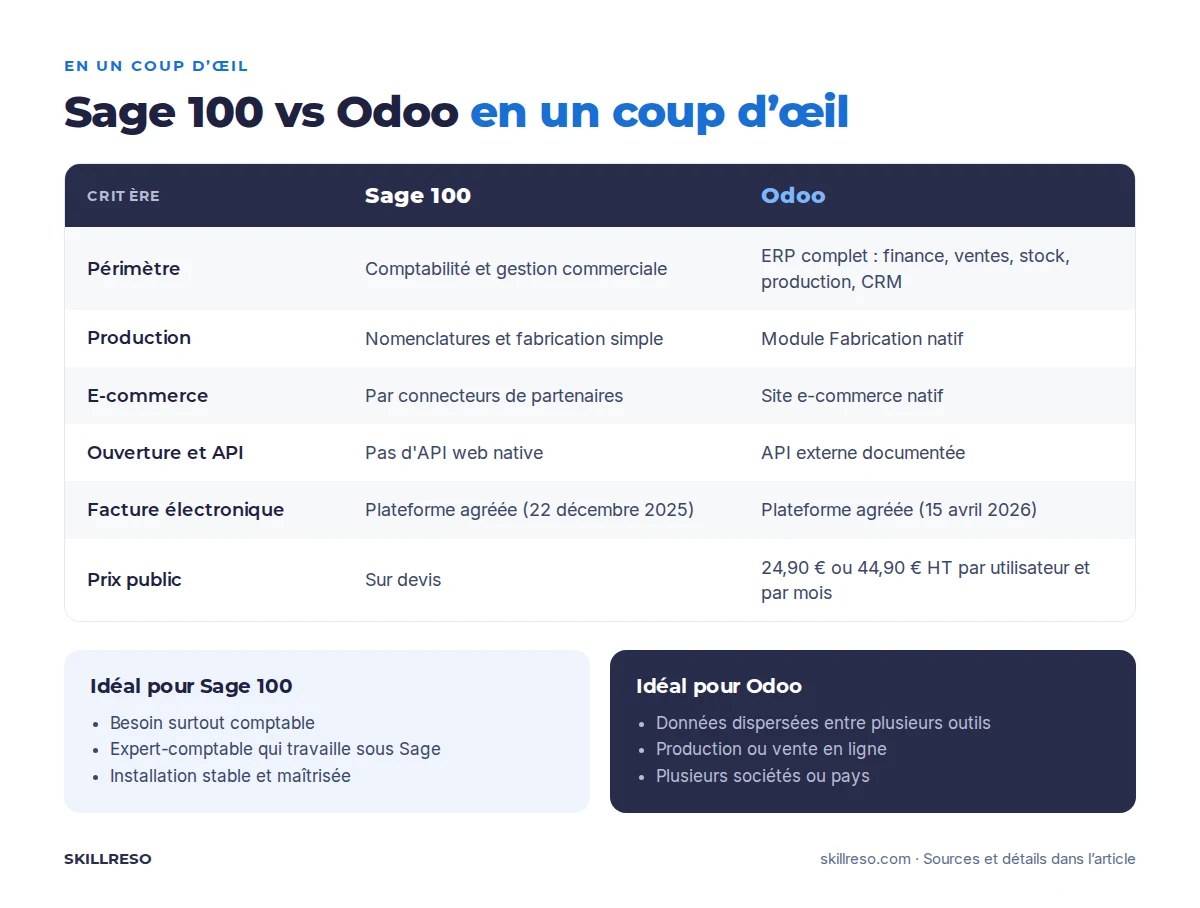
Sage 100 vs Odoo comparison table
| Criterion | Sage 100 | Odoo |
|---|---|---|
| Functional scope | Accounting and sales management, optional finance modules; other needs are handled by third-party solutions | Full ERP: finance, sales, purchasing, inventory, manufacturing, CRM, website, projects, HR (excluding full French payroll) |
| Accounting | Long-standing strength: fast data entry, reconciliation, accounting and tax reports, very familiar to accounting firms | Full French accounting (chart of accounts, FEC, VAT return), automated bank reconciliation |
| Sales management | Quotes, orders, delivery notes, invoices, purchasing, price lists, product ranges and packaging | Online quotes with e-signature, orders, subscriptions, price lists, customer portal |
| Inventory | Stock by warehouse, valuation, physical counts | Multi-warehouse, locations, barcodes, replenishment, lot and serial number traceability |
| Manufacturing | Bills of materials and simple manufacturing; full production management (MRP) requires Sage X3 or partner modules | Native Manufacturing app: bills of materials, manufacturing orders, work centers, quality, maintenance |
| CRM | No full CRM in Sage 100 Gestion commerciale; connected third-party tools | Native CRM linked to quotes, invoices and marketing |
| E-commerce | Through connectors provided by partners | Native e-commerce site, Shopify, WooCommerce or PrestaShop connectors available |
| Multi-company | One database per company, consolidation through add-on tools | Several companies in one database, inter-company transactions (Custom plan) |
| Hosting | On your own servers, or hosted by Sage on Microsoft Azure | Odoo Online, Odoo.sh, or a server of your choice (in France with Skillreso) |
| Openness and API | No native web API; integrations through Objets métiers (business objects), SQL access or third-party connectors | Documented external API (XML-RPC and JSON-RPC), accessible source code |
| E-invoicing | Sage is an approved platform (registered on December 22, 2025) | Odoo SA is an approved platform (registered on April 15, 2026) |
| Licensing model | Annual subscription, 12-month commitment; legacy licenses still in use at some customers | Community free; Enterprise per user per month |
| Public price | On quote (no price list published by Sage for Sage 100) | Standard €24.90 excl. VAT, Custom €44.90 excl. VAT per user per month (billed annually) |
| Ecosystem | Large network of resellers and accountants trained on Sage | Worldwide partner network, thousands of community modules (OCA) |
On e-invoicing, both publishers appear on the official list of operators that meet all the requirements, interoperability tests included, published on impots.gouv.fr (list updated on November 3, 2026). The timeline is as follows: since September 1, 2026, all companies must be able to receive electronic invoices, and large companies and mid-caps must issue them; SMEs and micro-businesses will have to issue them from September 1, 2027. The details on the Odoo side are explained in our article E-invoicing with Odoo: what changes in 2026-2027.
3-year cost: Sage 100 or Odoo for a 10-user SME
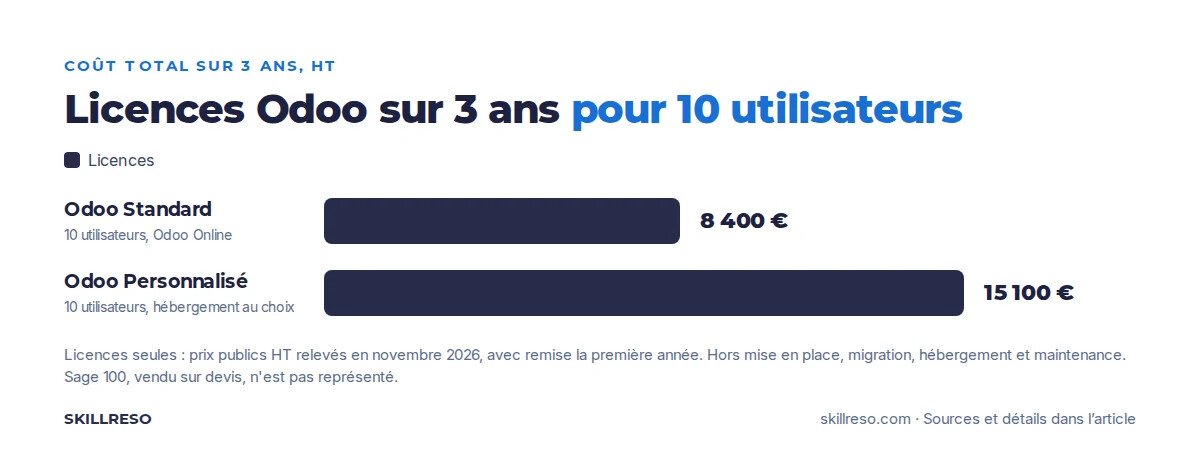
Ce graphique ne montre que les licences. Le coût de la mise en place (paramétrage, reprise des données, formation) dépend de votre projet : pour le chiffrer, utilisez notre Odoo implementation cost calculator.
Voici, pour la même PME, une hypothèse de coût complet sur trois ans : licences, mise en place (migration de Sage vers Odoo et formation comprises, au moins 15 jours) et 20 heures de maintenance par an, hors hébergement.
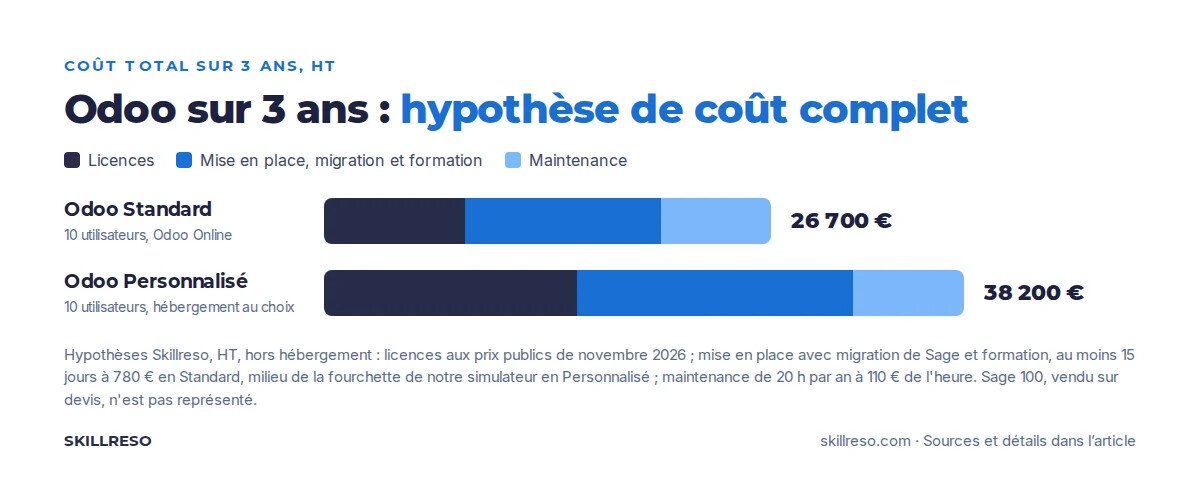
Assumptions: a French SME with 10 users and a single company, which needs accounting, sales management, inventory and a CRM. Payroll stays in dedicated software in both cases. Odoo prices are the public prices recorded in November 2026 on odoo.com/pricing, per user per month, billed annually; Odoo shows a 12-month discount on the users in the initial order (€19.90 instead of €24.90 on Standard, €35.90 instead of €44.90 on Custom). The implementation amounts come from our Odoo implementation cost calculator. All amounts are excluding VAT and rounded.
| Cost item over 3 years | Sage 100 Entreprise | Odoo Standard (Odoo Online) | Odoo Custom (hosted in France) |
|---|---|---|---|
| Licenses or subscription | On quote; as a rough guide, Sage 100 Comptabilité Essentials is quoted at €1,032 excl. VAT per year for one user, excluding sales management and additional users | About €8,400 (€2,400 in the first year, then €3,000 per year) | About €15,100 (€4,300 in the first year, then €5,400 per year) |
| Hosting | Included in the hosted version, or server and maintenance at your expense in the on-premise version | Included | About €3,600 (Classic plan at €99 per month) |
| Implementation, data migration, training | Sage partner quote | €8,000 to €12,500 (small project) | €13,000 to €20,000 (mid-size project) |
| Surrounding tools (CRM, e-commerce) | Third-party subscriptions to add | Included | Included |
| Indicative total | Available on quote | About €16,000 to €21,000 | About €32,000 to €39,000 |
For Sage 100, ask for a quote covering the same scope (users, sales management, Trésorerie or Immobilisations modules, hosting, support). On the Odoo side, the Standard plan is enough without custom modules or multi-company; otherwise, you need Custom. The cost most often overlooked on the Sage side is that of the surrounding tools: CRM, online store, Excel files for tracking inventory. That is where Odoo makes the difference, more than on the license.
Vous hésitez entre Sage 100 et Odoo ? Passez par nous : vous avez un seul interlocuteur pour comparer les deux solutions et décider. Skillreso est intégrateur Odoo ; si Sage 100 s'avère le meilleur choix pour vous, nous vous mettons en relation avec un partenaire qui travaille sur cet outil. Par transparence, nous avons avec ce partenaire un accord de recommandation réciproque, avec un intéressement financier de part et d'autre.
When to choose Sage 100 over Odoo
- Your needs are mainly accounting. If you are looking for robust accounting, fast keyboard data entry and proven tax reports, Sage 100 Comptabilité has been doing that job for years.
- Your accountant works with Sage. Many accounting firms know Sage inside out. Switching tools without them creates friction at review and year-end closing time.
- Your payroll runs on Sage 100 Paie & RH and everything works. Odoo does not fully cover French payroll; you will keep separate payroll software anyway.
- Your setup is stable and fits your needs. If Sage 100 covers your processes and your users know it well, nothing forces you to migrate. Since Sage is an approved platform, the e-invoicing reform is not, on its own, a reason to switch.
- You are a very small business. For simple invoicing and accounting, Sage Active may be enough, with no implementation project.
When Odoo is the better choice
- Your data is scattered. Accounting and sales management in Sage, CRM and website elsewhere, inventory in Excel: Odoo brings everything together in a single database.
- You manufacture. Odoo's Manufacturing app handles bills of materials, manufacturing orders, work centers and quality. See our page Odoo for production and manufacturing.
- Vous vendez en ligne. Le site e-commerce est natif avec Odoo Website et son module e-commerce : catalogue, prix et stock viennent directement d'Odoo. Odoo se connecte aussi aux boutiques existantes, par exemple avec une reliable Odoo and Shopify connection.
- You want openness. Odoo's API and accessible source code make it easier to connect with your other tools.
- You have several companies or several countries. Odoo manages several companies in a single database and offers Belgian and Swiss localizations, useful if you do business in Belgium or Switzerland.
- You want clear pricing. The per-user price is public, and hosting can be in France, with us for example (Odoo hosting and deployment).
Migrating from Sage to Odoo: what we transfer and how
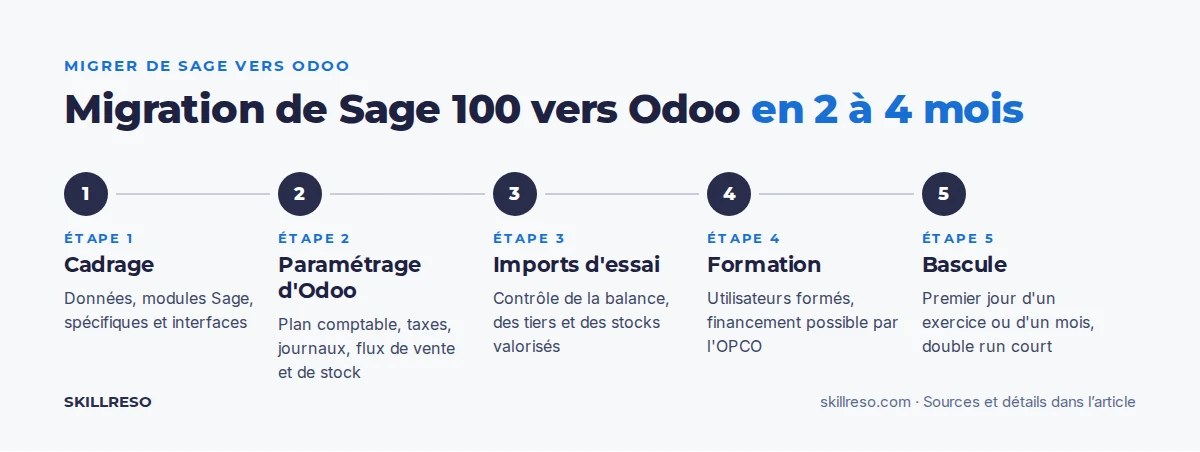
Migrating from Sage 100 to Odoo is a well-charted project. Sage 100 lets you export its data (contact, product, sales document and journal entry files), and Odoo has import tools, including a FEC import in the French localization of Odoo Enterprise. The real work lies in preparing and checking the data.
The data transferred
- Contacts. Customers and suppliers with their addresses, contacts, payment terms, VAT and SIRET numbers, bank details. In Sage, each customer or supplier has its own account (for example CLI001) linked to a 411 or 401 control account. In Odoo, the customer or supplier is a contact record, and journal entries carry the contact on a shared receivable or payable account. This is the first mapping to establish.
- Products. References, descriptions, product families, units, purchase and sale prices, price lists by customer category, barcodes, suppliers. Sage product ranges (size, color) become variants in Odoo; bills of materials become Odoo bills of materials.
- Inventory. Quantities per warehouse at the go-live date, with their valuation. Check the valuation method (weighted average cost or FIFO) before importing.
- Balances and open items. The opening balance and, above all, the detail of unpaid customer and supplier invoices, so you can reconcile payments and send reminders in Odoo.
- Journal entries and FEC. Odoo's FEC import transfers the chart of accounts, journals, contacts and entries from the FEC (French standard audit file of accounting entries) in text format (the XML format is not accepted). Journals whose code already exists are reused; new ones are prefixed “FEC-”. If you import several fiscal years, the opening entries become redundant and must be reversed.
- Sales history. Quotes, orders, delivery notes and invoices from previous years. These are usually transferred in simplified form, for statistics and reference.
The chart of accounts
Many Sage files use 8-digit accounts, with sub-accounts created over the years. Odoo relies on the French general chart of accounts. The FEC import strips trailing zeros (65800000 is matched to 658000), but you need to decide, with your accountant, which sub-accounts to keep, which to merge, and how to map Sage's analytical sections to Odoo's analytic plans. VAT codes also need a mapping table, especially for VAT on payments received.
Steps and timeline
- Scoping: inventory of the data, the Sage modules in use, custom developments and interfaces (bank, payroll, website).
- Odoo configuration: companies, chart of accounts, taxes, journals, sales, purchasing and inventory flows.
- Test imports on a test database, followed by checks: trial balance, customer and supplier accounts, valued inventory.
- User training, funded by your OPCO if needed (OPCO-fundable Odoo training).
- Go-live on a chosen date, ideally the first day of a fiscal year or month, followed by the transfer of open items and inventory.
For a 10-user SME covering accounting, sales management and inventory, allow 2 to 4 months on average between scoping and go-live. Our method is described on the page Odoo implementation.
The parallel run period
A parallel run means operating Sage and Odoo side by side for a short period, often a month, and then comparing the results: revenue, VAT, customer receivables, inventory. It is reassuring, but it doubles data entry. In our migration projects, we limit it to accounting, then keep Sage in read-only mode for past fiscal years. Make sure you can still produce the FEC for closed fiscal years in case of a tax audit.
Pitfalls to avoid
- Transferring dirty data. Duplicate contacts, inactive products, suspense accounts: clean up Sage before exporting.
- Forgetting reconciliation. A correct balance with unreconciled invoices makes payment reminders impossible. Transfer open items one by one.
- Breaking invoice numbering. Numbering must remain continuous and chronological: choose a new, documented sequence in Odoo at the go-live date.
- Underestimating customizations. In-house developments, partner modules, automated imports: list them during scoping, because each one must be replaced by a standard Odoo feature or a module.
- Leaving past periods open. After the migration, lock the imported periods, as explained in our article on the accounting lock date in Odoo.
- Switching approved platforms without notice. If you received your electronic invoices through Sage's platform, plan the move to Odoo's platform or another platform, and update the directory. Our page e-invoicing with Odoo covers this in detail.
Après la migration : hébergement, infogérance et site web
Skillreso sait héberger, déployer, infogérer et optimiser votre Odoo. Notre infrastructure dédiée est hébergée en France, avec sauvegardes quotidiennes, supervision continue et montées de version, code sur mesure compris : voir notre page Odoo hosting and deployment.
Nous construisons aussi votre site web, rapide et optimisé pour le référencement, en plusieurs langues : soit directement avec Odoo, soit avec une architecture headless pensée pour les pure players e-commerce (voir notre site headless Odoo). Pour voir Odoo sur vos propres cas, demandez une Odoo demo.
Sage 100 vs Odoo: frequently asked questions
Can Odoo replace Sage 100?
Yes. Odoo covers Sage 100's accounting and sales management, and adds advanced inventory, manufacturing, CRM and e-commerce. Only French payroll usually stays in dedicated software.
Odoo or Sage: which is cheaper?
Odoo publie ses prix : 24,90 € HT par utilisateur et par mois en Standard, 44,90 € HT en Personnalisé (paiement annuel, novembre 2026), avec une remise la première année. Sage 100 est vendu sur devis. Pour comparer, demandez un devis Sage sur le même périmètre à notre partenaire (avec qui nous avons un accord de recommandation réciproque, voir plus haut), que nous pouvons vous présenter, et ajoutez le coût des outils tiers (CRM, e-commerce) que l'ERP Odoo inclut.
How long does a migration from Sage to Odoo take?
For a 10-user SME covering accounting, sales management and inventory, allow 2 to 4 months on average between scoping and go-live. The timeline depends mainly on the quality of the Sage data and on the custom developments to be replaced.
Can you import the Sage FEC into Odoo?
Yes. The French localization of Odoo Enterprise offers a FEC import in text format, which transfers the chart of accounts, journals, contacts and journal entries. You then need to check the trial balance, harmonize the 8-digit accounts and reverse duplicate opening entries if you import several fiscal years.
Are Sage 100 and Odoo ready for e-invoicing?
Yes. Sage and Odoo SA both appear on the official list of approved platforms published by the French tax authorities, Sage since December 22, 2025 and Odoo since April 15, 2026. The reform alone therefore does not justify a migration; the choice comes down to functional scope.
What is a good Sage 100 alternative for a small business?
For a very small business with few invoices, an online tool such as Sage Active or a single Odoo app may be enough. As soon as you manage inventory, several sales reps or an online store, an ERP like Odoo saves you from piling up software.
Sage 100 or Odoo: next steps
List what Sage 100 does well for you, and what happens alongside it: Excel files, CRM, website, re-keying. If the list of side tools is long, Odoo deserves a serious look. Then:
- estimate your budget with our Odoo implementation cost calculator ;
- request a free audit of your Sage setup to scope the data migration;
- see Odoo on your own use cases with an Odoo demo ;
- compare with other software in our comparison of business management software vs Odoo.
Skillreso has been an Odoo integrator since 2015, in Angers, Besançon and Geneva. We run migrations from Sage 100 together with your accountant.